QR Codes Explained: Types, Uses, Content and Configuration
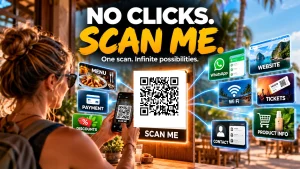
QR codes are one of the simplest ways to connect the physical world to the digital one.
Put one on a café table and it can open a menu. Put one on a business card and it can save contact details. Put one on a product and it can open instructions, product information or a payment system.
The key is understanding what you want the QR code to do, what information it needs to contain, and how that information should be configured.
QR Code Content: Quick Reference
| Content Type | What It Does | Example | Key Data Required |
|---|---|---|---|
| Website URL | Opens a website | Menu, homepage | URL |
| Landing Page | Opens a campaign page | Offer, registration | URL + tracking |
| Plain Text | Displays stored text | Instructions | Text |
| Contact / vCard | Creates a contact | Business card | Name, phone, email |
| Telephone | Opens phone dialler | Sales number | Phone number |
| Opens email application | Enquiry | Email + optional subject | |
| SMS | Prepares a text message | Customer response | Phone + message |
| Wi Fi | Connects to a network | Café guest Wi Fi | SSID + security + password |
| Location | Opens a map | Business location | Coordinates or map URL |
| Event / Calendar | Creates calendar entry | Seminar | Date, time, location |
| Social Profile | Opens social account | Instagram profile | Profile URL |
| App Download | Opens app store | Mobile app | App Store / Play URL |
| Payment | Initiates payment | QRIS | Payment scheme data |
| PDF / Document | Opens document | Product manual | Document URL |
| Video / Audio | Opens media | Product demonstration | Media URL |
| Authentication | Starts login or pairing | Device login | Token / session data |
| Digital Wallet | Opens wallet/payment request | Crypto payment | Wallet address / protocol |
| Device Pairing | Starts device setup | Smart device | Protocol specific data |
| Product / Traceability | Identifies product | Batch information | Product identifier + attributes |
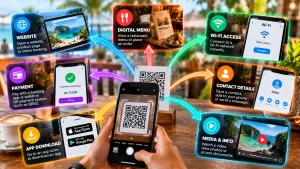
The important point is that most of these are not different QR Code technologies. They are different types of information encoded into a QR Code.
1. Website URL
The most common QR Code application is a URL.
Examples:
- Restaurant menu
- Business website
- Property listing
- Portfolio
- Product information
- Booking page
Required:
- Destination URL
- Static or dynamic decision
- Optional tracking parameters
For most businesses, this is the simplest and most flexible QR Code application.
2. Landing Page or Campaign URL
Instead of sending visitors to a homepage, send them directly to a page designed for a specific action.
Examples:
- Register for an event
- Claim an offer
- Download a guide
- Request a quote
- Enter a competition
Required:
- Landing page URL
- Campaign identifier
- Optional UTM parameters
- Analytics
For printed marketing, this makes it possible to measure traffic generated by the QR Code.
3. Plain Text
The actual text is stored inside the QR Code.
Examples:
- Short instructions
- Reference numbers
- Product information
- Short messages
Required:
- Text
- Character encoding
- Error correction level
The information cannot be changed without generating a new QR Code.
Do not use this method for passwords or confidential information.
4. Contact Details / vCard
A QR Code can contain structured contact information that a phone can offer to save as a contact.
Examples:
- Business cards
- Sales representatives
- Conference badges
- Property agents
Required:
- Name
- Organisation
- Job title
- Phone
- Website
- Optional address
- vCard format
Keep the contact record reasonably small. More data creates a denser QR Code.
5. Telephone Number
A telephone URI can open the phone dialler.
Example:
tel:+61212345678
Required:
- Telephone number
- Country code
tel:URI
Useful on advertisements, business cards, service counters and support information.
6. Email
An email QR Code can prepare an email with the recipient, subject and optionally the message already entered.
Example:
mailto:hello@example.com
Required:
- Email address
- Optional subject
- Optional message
- Correct URL encoding
The user normally still needs to press Send.
7. SMS
An SMS QR Code can prepare a text message.
Required:
- Telephone number
- Optional message
sms:URI
Useful for enquiries, registrations, customer responses and simple campaigns.
Device behaviour varies, so test it before deployment.
8. Wi Fi
A Wi Fi QR Code can contain the information required to connect to a wireless network.
A common structure is:
WIFI:T:WPA;S:NetworkName;P:NetworkPassword;;
Required:
- SSID
- Security type
- Password
- Hidden network status, if applicable
This is particularly useful in cafés, hotels, offices and accommodation.
Use a dedicated guest network rather than exposing credentials for a primary network.
9. Location
A QR Code can open a map location.
Required:
- Map URL, or
- Latitude and longitude
Examples:
- Business location
- Property
- Hotel
- Event venue
- Tourist attraction
A map URL is often the simplest option because it can open directly in a familiar mapping application.
10. Event / Calendar
A QR Code can provide calendar information or open an event registration page.
Required:
- Event name
- Start date and time
- End date and time
- Time zone
- Location
- Optional description
- Calendar format such as iCalendar
For public events, a registration URL is often simpler.
11. Social Media
Social media QR Codes normally contain a URL.
Examples:
- YouTube
- TikTok
Required:
- Profile URL
A multi link landing page can be more useful when several social networks need to be promoted.
12. App Download
A QR Code can send users to an application download page.
Required:
- Apple App Store URL
- Google Play URL
- Or a landing page that identifies the user’s device
A smart landing page is generally more flexible than encoding only one app store URL.
13. Payment
Payment QR Codes are different because the information must follow the requirements of the payment system.
Examples:
- QRIS
- Payment provider checkout
- Bank payment request
- Digital payment systems
Required:
- Payment scheme
- Merchant identifier
- Amount, if applicable
- Currency, where applicable
- Transaction reference
- Scheme specific data
A generic QR generator does not automatically create a valid payment QR Code.
For QRIS, use the appropriate QRIS merchant solution and its required specification.
14. PDF and Documents
The QR Code normally contains a URL to the document rather than the document itself.
Examples:
- Manuals
- Brochures
- Property information
- Menus
- Price lists
- Safety instructions
Required:
- Document URL
- Appropriate access permissions
Using a stable URL means the document can be updated without changing the printed QR Code.
15. Video and Audio
The QR Code links to hosted media.
Examples:
- Product demonstrations
- Property tours
- Training
- Audio guides
- Podcasts
Required:
- Media URL
- Appropriate access permissions
- Mobile compatible destination
Large media files should normally be hosted rather than encoded directly into the QR Code.
16. Authentication
QR Codes can also be used for login, authorisation and device pairing.
Examples:
- Application login
- Device authentication
- Session approval
- Account linking
Required:
- Authentication protocol
- Endpoint
- Unique token or session identifier
- Expiry
- Server side validation
These are specialised implementations and should not be treated like ordinary marketing QR Codes.
17. Digital Wallets
Digital wallets can use QR Codes to share addresses or payment requests.
Required:
- Wallet address
- Supported network
- Optional amount
- Protocol specific data
Always verify the destination before making a transaction.
18. Device Pairing
Some applications use QR Codes to configure or pair devices.
Examples:
- Smart home equipment
- Industrial equipment
- Application setup
- Device provisioning
Required:
- Device or application protocol
- Device identifier
- Pairing information
- Security or expiry data
There is no universal QR Code that automatically pairs every type of Bluetooth or smart device.
19. Product Identification and Traceability
QR Codes can carry product identifiers and related information.
Examples:
- Product identification
- Batch numbers
- Expiry information
- Recalls
- Warranty registration
- Product authenticity
Required:
- Applicable identification standard
- Product identifier
- Required attributes
- Data format
For retail and supply chain applications, GS1 Digital Link can connect standardised product identifiers with online product information.
Technical Types of QR Codes
The content above describes what the QR Code does.
Now we can look at the actual QR Code technologies used to encode that information.
20. Standard QR Code
This is the familiar square QR Code with three large position markers.
It is the default choice for most consumer and business applications.
Standard QR Codes have 40 versions, from Version 1 at 21 × 21 modules to Version 40 at 177 × 177 modules.
The required version depends on the amount of data and error correction level.
Typical uses:
- URLs
- Contact details
- Wi Fi
- Text
- Marketing
- Product information
- Payments
21. Micro QR Code
A smaller QR format designed for limited physical space.
It uses a single position detection pattern instead of the three used by standard QR Codes.
Typical uses:
- Small product labels
- Electronic components
- Compact industrial identification
It is designed for relatively small amounts of data.
22. rMQR Code
rMQR stands for rectangular Micro QR Code.
Instead of the traditional square shape, it uses a rectangular format.
Typical uses:
- Narrow labels
- Electronic components
- Industrial identification
- Manufacturing
It is particularly useful where a conventional square QR Code does not fit efficiently.
23. SQRC
SQRC is a specialised QR Code format developed by DENSO WAVE.
It supports controlled access to certain encoded information.
Typical uses:
- Industrial systems
- Asset management
- Controlled information
Compatible systems are required to use its protected information features.
24. Frame QR
Frame QR is a specialised format developed by DENSO WAVE that provides a flexible area within the QR Code design.
Typical uses:
- Branding
- Advertising
- Promotional campaigns
- Product authentication
It should not be confused with simply placing a logo over a conventional QR Code.
25. GS1 Digital Link
GS1 Digital Link is a standards based approach for representing product identifiers and related information in web addresses.
That URL can then be encoded into a QR Code.
Possible information includes:
- Product identification
- Batch information
- Expiry
- Product details
- Recall information
- Sustainability information
The QR Code carries the URL. GS1 defines how the product identification information is structured.
Static vs Dynamic QR Codes
This is another distinction that causes confusion.
Static and dynamic describe how the information is managed, not the physical QR Code format.
Static
The information is encoded directly into the QR Code.
Good for:
- Contact details
- Wi Fi
- Plain text
- Permanent URLs
- Fixed information
Advantages:
- Simple
- No QR management service required
- No subscription required for the code itself
Disadvantage:
Once printed, the encoded information cannot be changed.
Dynamic
The QR Code normally contains a URL that redirects through a service or system.
Good for:
- Marketing campaigns
- Menus
- Product information
- Campaign tracking
- Frequently changing destinations
Advantages:
- Destination can be changed
- Analytics may be available
- Printed material can be reused
Disadvantages:
- May require a subscription
- Depends on the redirect service
- Service failure can affect printed codes
There is a third option worth remembering:
A static QR Code pointing to a URL you control.
If the URL remains the same, you can change the content on your website without changing the QR Code.
QR Code Configuration
Once the content and QR Code format are selected, these are the main specifications to define.
Content
Define exactly what is being encoded.
- URL
- Text
- Contact record
- Wi Fi credentials
- Payment data
- Product identifier
- Other structured data
QR Code Format
For most applications:
Standard QR Code
For specialised applications:
- Micro QR
- rMQR
- SQRC
- Frame QR
- GS1 related implementations
Error Correction
Standard QR Codes provide four levels:
| Level | Approximate restoration capability |
|---|---|
| L | 7% |
| M | 15% |
| Q | 25% |
| H | 30% |
Higher correction means more redundancy and usually a denser symbol.
Choose the level according to the printing environment and design requirements.
Version
Standard QR Codes range from:
Version 1: 21 × 21 modules
to
Version 40: 177 × 177 modules
The required version is determined by the amount and type of data plus the error correction level.
You normally don’t need to choose the version manually. A competent QR generator calculates the smallest suitable version.
Quiet Zone
A standard QR Code requires a clear margin around the symbol.
The conventional minimum is four modules on each side.
Do not place text, borders or graphics inside this area.
Size
Physical size depends on:
- Data density
- Scanning distance
- Camera quality
- Printing quality
- Lighting
- Surface
- Viewing angle
A tiny QR Code on a business card has very different requirements from one on a billboard.
Colour and Contrast
The safest configuration remains:
Dark modules + light background
Custom colours are possible, but contrast must remain strong.
Avoid:
- Low contrast
- Busy backgrounds
- Gradients through the code
- Reflective surfaces
- Excessive logo coverage
Always test the final artwork.
File Format
For digital use:
- PNG
- SVG
For print:
- SVG
- EPS where supported
For professional printing, vector output is generally preferable.
QR Code Specification Checklist
Before generating the final code, define:
| Specification | Requirement |
|---|---|
| Purpose | What happens after scanning? |
| Content | What information is encoded? |
| Format | Standard, Micro, rMQR, etc. |
| Static / Dynamic | Can the destination change? |
| Data | Exact content or URL |
| Error correction | L, M, Q or H |
| Version | Automatically calculated or specified |
| Physical size | Final printed dimensions |
| Quiet zone | Minimum four modules for standard QR |
| Contrast | Strong foreground/background contrast |
| Branding | Logo and colours, if required |
| Output | PNG, SVG, PDF or EPS |
| Testing | Multiple devices and final artwork |
| Maintenance | Who controls the destination? |
The Bottom Line
For most businesses, the process is simple:
1. Decide what should happen when the code is scanned.
2. Choose the content type.
3. Decide whether the destination needs to change.
4. Use a standard QR Code unless you have a specific reason to use another format.
5. Configure the data, error correction, size and quiet zone correctly.
6. Test the actual finished code before printing thousands of copies.
The biggest mistake is treating a QR Code as the product.
It isn’t.
The QR Code is the bridge.
What matters is what sits on the other side of that bridge.
This version is much more reference article than essay: the table gives the reader the answer immediately, while the sections provide the technical detail needed to implement each option.