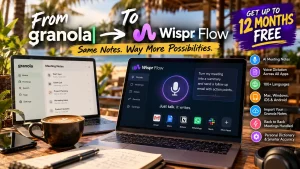
Wispr Flow: The AI Voice Tool Worth Considering If You Use Granola
I’ve always liked technology that removes a bit of friction from everyday work.
Not technology for the sake of having another shiny app.
Technology that lets you get something done faster and with less effort.
That’s what caught my attention about Wispr Flow.
It’s an AI voice to text tool that lets you speak naturally and turn your words into polished text across the apps you already use.
And if you’re currently paying for Granola, there’s an even more interesting reason to take a look.
Wispr Flow is currently offering eligible paid Granola users the opportunity to switch and receive credit for their remaining paid Granola time, plus up to three bonus months, for up to 12 months of Wispr Flow in total.
That makes this more than just another AI productivity tool worth testing.
It could be a very interesting Granola alternative.
What Is Wispr Flow?
Wispr Flow is an AI powered voice dictation tool designed to turn your speech into clear, polished text.
Instead of typing everything out, you simply speak.
Flow takes what you say and handles things such as punctuation, formatting, filler words and corrections.
The important part is that it isn’t restricted to one particular writing application.
Wispr Flow is designed to work anywhere you can type, including apps and websites such as Gmail, Google Docs, Notion and WhatsApp.
It is available on Mac, Windows, iPhone and Android. Wispr says Flow supports more than 100 dictation languages.
In simple terms:
You talk. Flow writes.
And that’s a surprisingly powerful change to the way you work.
Why Is Wispr Flow Interesting?
Here’s the thing about typing.
Most of us don’t actually think in perfectly formatted paragraphs.
We think out loud.
We jump from one idea to another.
We change our minds.
We say “um”, “ah”, “actually…” and then come up with a better way of saying something.
Traditional speech to text generally gives you a transcript of what you said.
Wispr Flow is designed to go further.
It can remove filler words, add punctuation, format lists and understand corrections as you speak. It can also learn your vocabulary, terminology and preferred style.
That makes it particularly interesting for people who have lots to say but don’t particularly enjoy typing it.
Wispr Flow And Granola Are Not Quite The Same Thing
This is an important distinction.
Granola is primarily known as an AI meeting notes tool.
Wispr Flow now combines AI meeting notes with everyday voice dictation.
So the interesting question isn’t simply:
“Which meeting notes app is better?”
It’s:
“Do I want my AI voice tool to work outside my meetings as well?”
That’s where Wispr Flow becomes particularly interesting.
Wispr’s current Granola switch offer highlights meeting transcription and notes alongside voice dictation for emails, messages and documents.
Wispr Flow Vs Granola
Here’s the basic difference as I see it.
| Feature | Wispr Flow | Granola |
|---|---|---|
| AI meeting notes | Yes | Yes |
| Voice dictation | Yes | Limited |
| Dictate across apps | Yes | No |
| AI transcription | Yes | Yes |
| Personal terminology | Yes | Yes |
| Voice writing outside meetings | Yes | Limited |
| Import exported Granola notes | Yes | — |
| Meeting transcript refinement | Yes | — |
| Back to back meeting handling | Yes | — |
These aren’t simply marketing claims. They are based on the comparison currently published by Wispr as part of its Granola switch offer.
And that distinction matters.
If all you want is meeting notes, there are plenty of tools available.
If you want meeting notes plus a voice first way of working across your computer and phone, Wispr Flow becomes a different proposition.
What Can You Actually Do With Wispr Flow?
This is where I think voice dictation gets interesting.
You can use it for much more than taking notes.
Write emails
Instead of composing an email by keyboard, simply explain what you want to say.
Flow turns the speech into formatted text.
Write documents
Have an idea for an article?
Talk it out.
Need to explain something to a client?
Talk it out.
Want to create a first draft?
Talk it out.
Create social media posts
You can speak your thoughts naturally and let Flow turn them into text that you can then edit.
Capture ideas
This is probably one of the simplest use cases.
You have an idea.
Open your notes.
Speak.
Done.
Work with AI
You can dictate prompts into tools such as ChatGPT, Claude or other AI applications instead of typing every prompt manually.
For anyone using AI heavily, that alone could save a surprising amount of keyboard time.
Take meeting notes
Wispr Flow’s Notetaker can record meetings and turn them into transcripts, summaries and recaps, helping you stay focused on the conversation instead of trying to type everything down.
Wispr Flow For Digital Nomads
This is one of the reasons I find tools like this particularly interesting.
When you’re working from a café, hotel room, airport lounge or somewhere overlooking the ocean, you don’t always want to sit there hammering away at a keyboard.
Sometimes you just want to talk.
I’ve spent enough time working remotely to know that your environment can change how you work.
A good voice to text tool can make it much easier to capture ideas when you’re away from your normal desk.
Wispr Flow runs on desktop and mobile, so the same basic voice first workflow can travel with you.
That’s particularly useful for:
- Digital nomads
- Remote workers
- Bloggers
- Content creators
- Entrepreneurs
- Coaches
- Consultants
- Salespeople
- Marketers
- People who spend a lot of time in meetings
- Anyone who thinks faster than they type
One Feature I Really Like
The idea of a personal dictionary is easy to overlook.
But think about what happens when you work in a specialist industry.
You’ve got:
- People’s names
- Company names
- Product names
- Technical terminology
- Brand names
- Acronyms
- Industry jargon
Generic voice recognition can struggle with these.
Wispr Flow lets you build vocabulary around the words that matter to you, and its dictionary can be used across dictation and meeting notes.
That’s the sort of small feature that can make a productivity tool considerably more useful over time.
What About Languages?
Wispr Flow currently supports 100+ dictation languages, with language and regional spelling options available across supported platforms.
That’s particularly interesting if you work internationally, travel frequently or regularly communicate in more than one language.
One important distinction is that Flow dictation and Notetaker meeting transcription have different language support, so it’s worth checking the current Wispr documentation if multilingual meeting transcription is important to you.
The Granola Switch Offer
Now we get to the really interesting part.
If you’re already paying for Granola, Wispr Flow currently has a specific offer for eligible individual paid Granola users.
Wispr says it will cover your remaining paid Granola time with Wispr credit, plus up to three additional bonus months.
The maximum is up to 12 months of Wispr Flow.
Verification is required, and the amount of credit depends on your remaining paid Granola time when the Wispr credit starts.
So if you’re already paying for Granola, this is definitely worth investigating before simply renewing.
How The Granola To Wispr Flow Switch Works
Wispr keeps the process fairly simple.
1. Enter your email
Submit your email through the Wispr Flow offer page.
You’ll receive instructions by email.
2. Verify your Granola subscription
Follow the instructions to verify your eligible Granola plan.
Wispr will then review the subscription and determine your available credit.
3. Start using Wispr Flow
You can start using Wispr for meetings, messages, documents and everyday dictation while your submission is reviewed.
Who Should Consider Wispr Flow?
I wouldn’t suggest that everybody needs another AI subscription.
That’s exactly how we end up with subscription overload.
But Wispr Flow is worth considering if you regularly:
- Take meeting notes
- Write emails
- Write documents
- Create content
- Use AI tools
- Dictate messages
- Work remotely
- Work across multiple devices
- Travel while working
- Hate typing
- Think faster than you can type
- Already pay for Granola
And if you’re already a paid Granola user, the current switching offer makes the decision even more interesting.
Is Wispr Flow Worth Trying?
For me, the interesting question isn’t whether voice dictation is technically possible.
We’ve had voice recognition for years.
The interesting question is whether it has become good enough to change the way you actually work.
Wispr Flow is clearly aiming at that problem.
It’s not just trying to turn speech into words.
It’s trying to turn natural speech into usable writing.
That includes formatting, punctuation, corrections, personal vocabulary and different writing styles.
And that’s a much more interesting proposition.
My Take
I’m not particularly interested in adding another app to my life simply because somebody has put “AI” in front of it.
I’ve got enough of those already.
What interests me is friction removal.
If I can have an idea, speak it naturally and end up with something I can actually use, that’s useful.
If I can dictate an email instead of typing it, useful.
If I can capture an idea while I’m walking, useful.
If I can sit through a meeting without frantically trying to write everything down, useful.
And if one subscription can cover both AI meeting notes and everyday voice dictation, that’s even more interesting.
That’s why I think Wispr Flow is worth a look.
Already Paying For Granola?
Then I’d definitely check the current offer before doing anything else.
Eligible paid Granola users can potentially get their remaining paid time covered with Wispr credit, plus up to three bonus months, for up to 12 months total.
The offer is subject to eligibility and verification.
👉 Check The Wispr Flow Granola Switch Offer
👉 Check Wispr Flow
If you’re already paying for Granola, there’s little reason not to see what you’re eligible for.
Frequently Asked Questions
What is Wispr Flow?
Wispr Flow is an AI voice to text and dictation tool that turns spoken words into polished text across apps and websites.
Is Wispr Flow a Granola alternative?
Yes, although the two products have different origins. Wispr Flow combines voice dictation with AI meeting notes, making it an alternative worth considering for people who want both capabilities in one subscription.
Can Wispr Flow replace Granola?
For some users, potentially yes. Wispr Flow’s current Granola switch offer is specifically designed for eligible paid Granola users who want to move to Wispr Flow.
How many free months can Granola users get?
Eligible users can receive credit for remaining paid Granola time plus up to three bonus months, with a maximum of up to 12 months of Wispr Flow. Verification is required.
Does Wispr Flow work on Mac and Windows?
Yes. Wispr Flow is available on Mac and Windows, as well as iPhone and Android.
Does Wispr Flow work on mobile?
Yes. Flow is available on iPhone and Android, although specific features can vary between platforms.
How many languages does Wispr Flow support?
Wispr says Flow supports more than 100 dictation languages.
Can I use Wispr Flow outside meetings?
Yes. That’s one of the key differences between Wispr Flow and a meeting only tool. Flow is designed for dictation in apps and websites, including email, documents, messaging and other text fields.
Can I import my Granola notes?
Wispr’s current Granola comparison says exported Granola notes, summaries and transcripts can be imported into Wispr Flow.
Is Wispr Flow just speech to text?
No. Wispr Flow is designed to clean up and format spoken language as you dictate, including punctuation, filler word removal, corrections and formatting.
Final Thought
Sometimes the best technology isn’t the technology that gives you more things to do.
It’s the technology that lets you do the things you’re already doing with less friction.
That’s what makes Wispr Flow interesting to me.
And if you’re already paying for Granola, the current up to 12 months free switching offer makes it particularly worth investigating.
Have a look, see what you’re eligible for, and decide for yourself.
👉 Check Wispr Flow